


Applicable Scope
This guide applies to Gate App
Before you start: Ensure you have completed identity verification and have sufficient funds in your Spot Account
Estimated time: 5 m
Objective
This guide will walk you through how to conduct margin trading on Gate App.
Steps
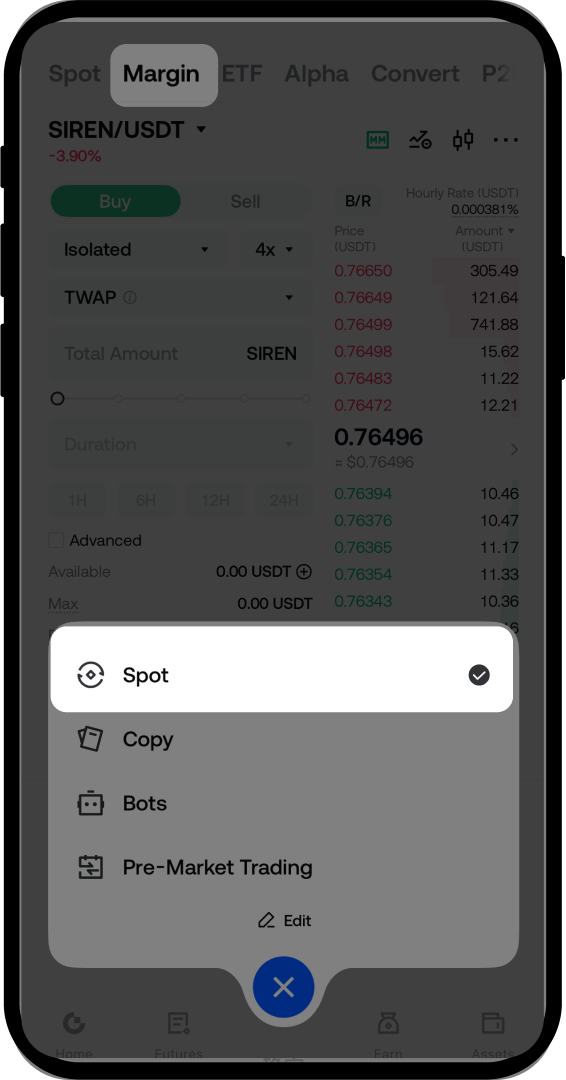
Step 1: Access the Margin Trading Page
- Log in to the Gate App.
- Tap [Trade] - [Spot].
- Select [Margin] to enter the margin trading page.
Step 2: Select Your Trading Pair
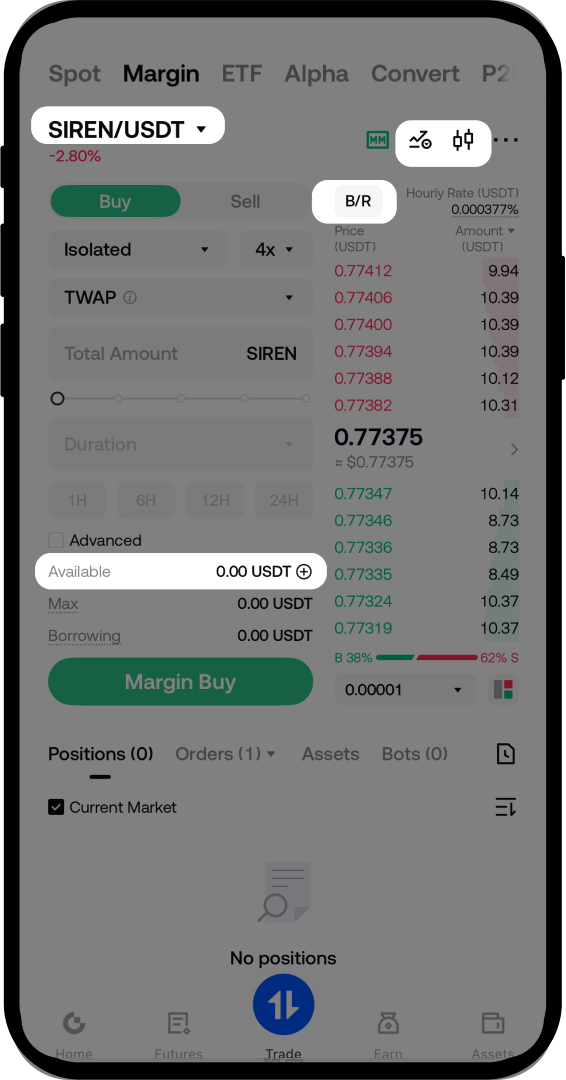
- Choose the trading pair you want to trade from the list.
- The available leverage for the selected pair will be displayed automatically.
- Review the page interface:
- Tap [B/R] to manually borrow or repay funds
- Tap the transfer icon to move funds between accounts
- Access the candlestick chart, market data analysis, and function settings from the bottom menu
Step 3: Transfer Funds to Margin Account
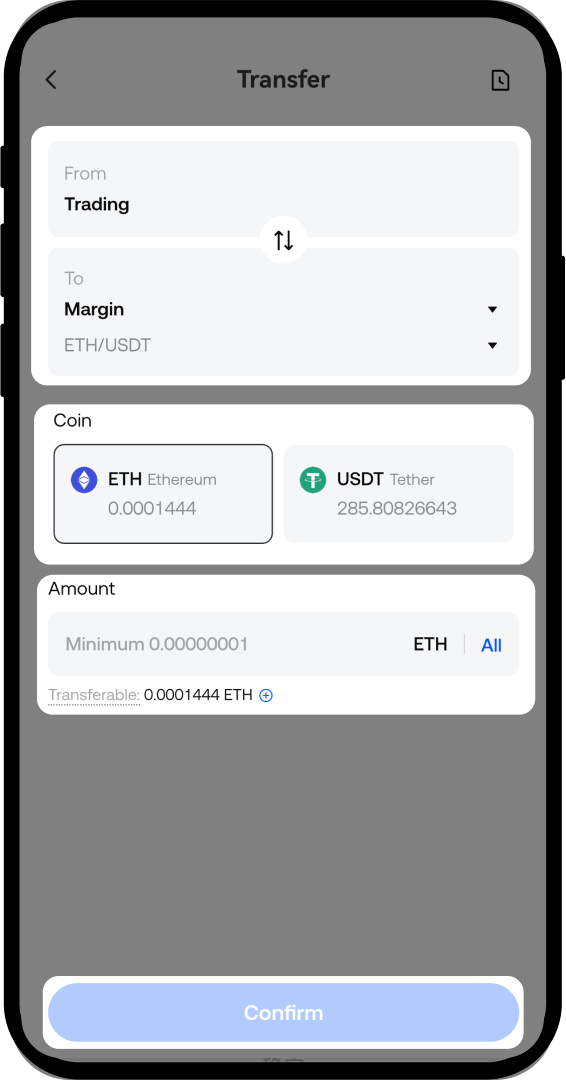
- Tap the transfer icon on the margin trading page.
- Select the transfer direction: from [Spot Account] to [Margin Account].
- Select the [Coin] you want to transfer.
- Enter the [Amount] you want to transfer.
- Tap [Confirm] to complete the transfer.
Step 4: Borrow Funds
After transferring funds, you can borrow assets using either Auto Borrow or Manual Borrow:
Option A: Auto Borrow (Recommended for Beginners)
- When placing an order, if your available balance is less than the order amount, the system will automatically borrow funds for you.
- Interest accrues immediately upon successful borrowing.
- The system will auto-repay your loan after order completion using received coins, prioritizing interest first, then chronological order.
Option B: Manual Borrow
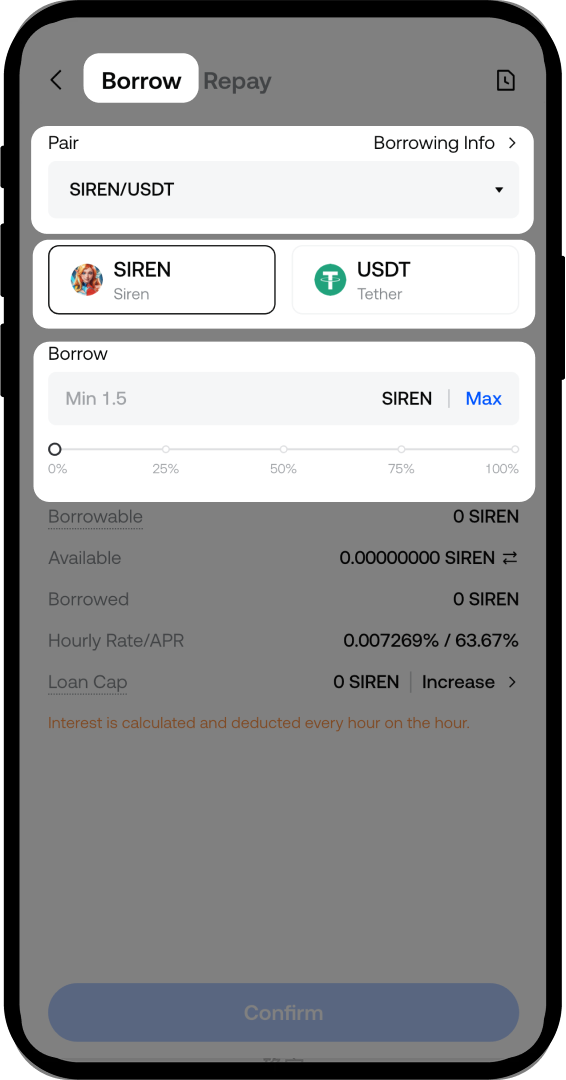
- Tap [B/R] on the margin trading page.
- Confirm the trading pair you want to borrow funds for.
- Select the coin you want to borrow (e.g., for BTC/USDT pair: borrow USDT if bullish on BTC, or borrow BTC if bearish).
- Enter the amount you want to borrow.
- Tap [Confirm] to complete the borrowing.
Step 5: Place a Margin Order
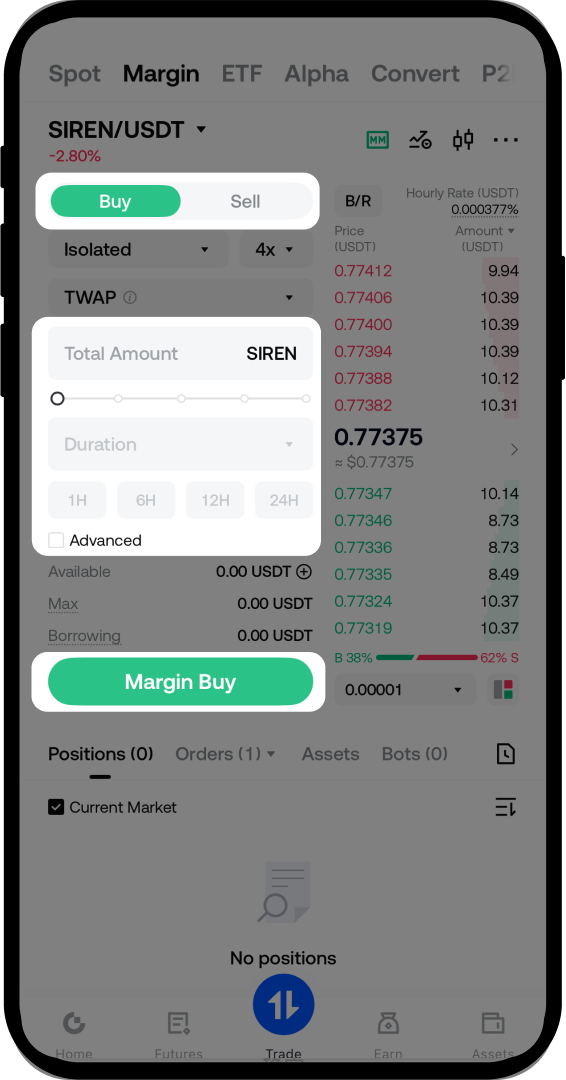
- Select [Buy] or [Sell] based on your trading strategy.
- Set the [Price] by either:
- Manually entering the desired price
- Tapping a price level in the order book for quick selection
- Enter the [Amount] you want to trade.
- Tap [Margin Buy] or [Margin Sell].
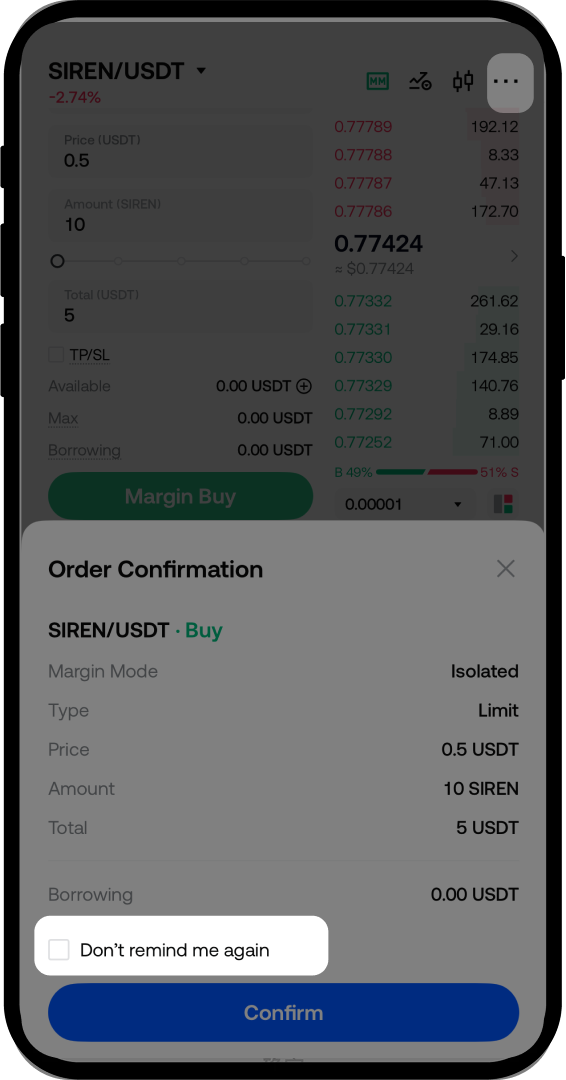
- Confirm your order in the popup window.
- (Optional) Check the box to skip order confirmation for future margin trades. You can re-enable this later via [...] - [Trading Settings] - [Order Confirmation].
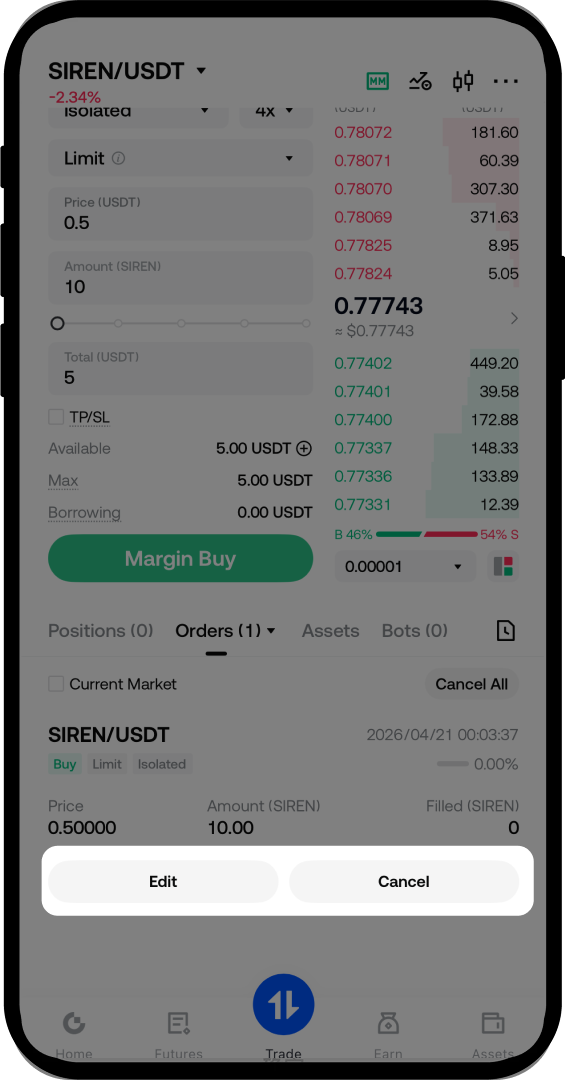
- After successful order placement, view your open orders in the [Orders] section.
- To cancel an order, tap the [Cancel] button next to the order.
Step 6: Close Position and Repay Loans
Option A: Close by Market Order (Quick Method)
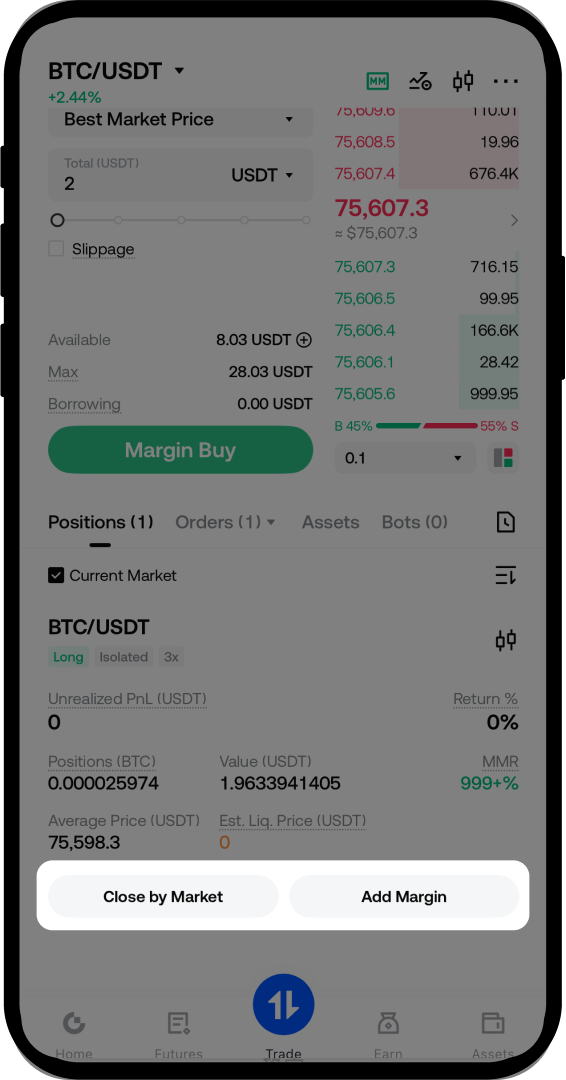
- Tap [Close by Market] to automatically close your position with auto-repayment enabled.
- For long positions: the system will sell to close the position.
- For short positions: the system will buy to close the position.
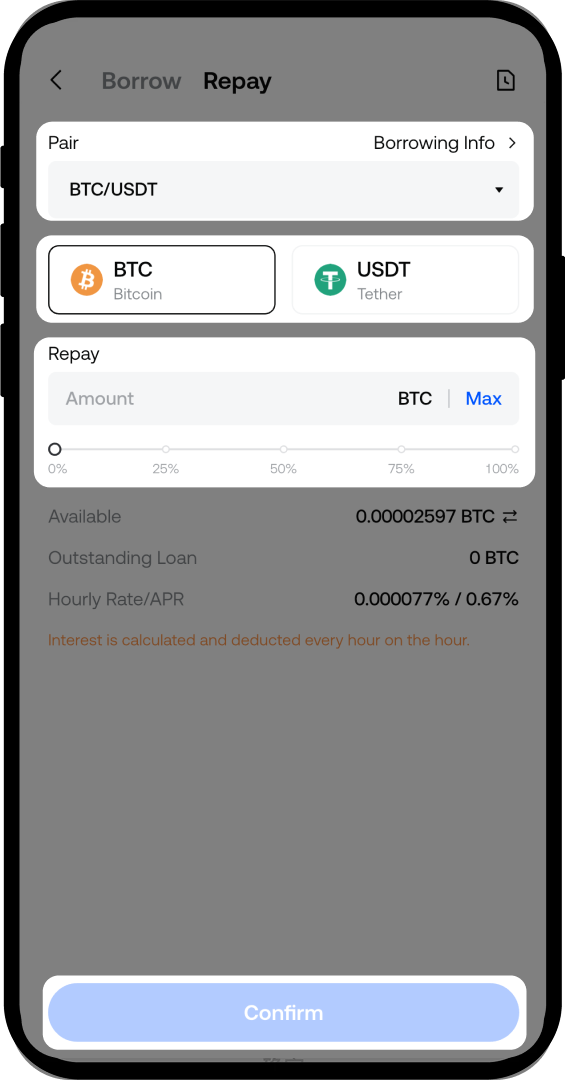
Option B: Manual Repayment
- Tap [B/R] on the margin trading page.
- Select the [Margin Pairs] you want to repay.
- Select the coin you want to repay (e.g., BTC or USDT).
- Enter the repayment amount (full or partial repayment is supported).
- Tap [Confirm] to complete the repayment.
Notes
- Margin trading involves borrowing funds to amplify potential gains, but it also magnifies potential losses.
- Interest accrues on borrowed funds from the moment of successful borrowing until full repayment.
- Ensure you maintain sufficient margin ratio to avoid liquidation.
- Always monitor your position and margin level, especially during high market volatility.
- Product features, interfaces, rules, and fee structures may be updated or adjusted at any time. Please refer to the latest announcements and actual platform information.
FAQ
Q1: What is the difference between Auto Borrow and Manual Borrow?
A: Auto Borrow automatically borrows funds when you place an order if your available balance is insufficient, and auto-repays after order completion. Manual Borrow requires you to manually borrow and repay funds through the [B/R] function, giving you more control over your borrowing timing and amount.
Q2: How is the interest calculated on borrowed funds?
A: Interest starts accruing immediately upon successful borrowing and continues until you fully repay the loan. Interest rates vary by coin and market conditions. You can check the current interest rates on the margin trading page.
Q3: What happens if I don't repay my borrowed funds?
A: Unpaid loans will continue to accrue interest. If your margin ratio falls below the maintenance margin level due to market movements or accumulated interest, your position may be subject to liquidation. It is recommended to monitor your margin level regularly and repay loans promptly.
Q4: Can I transfer funds back to my Spot Account before repaying borrowed funds?
A: You can only transfer the available balance that is not being used as collateral for your borrowed funds. To transfer all funds back to your Spot Account, you must first repay all outstanding loans.
Disclaimer
The content provided herein is for reference and educational purposes only and does not constitute any financial, investment, trading, or legal advice, nor does it constitute an offer or solicitation to buy or sell any digital assets. Gate makes no express or implied representations or warranties regarding the accuracy, completeness, or timeliness of the information contained herein. Product features, interfaces, rules, and fee structures may be updated or adjusted at any time. Please refer to the latest announcements and the actual information displayed on the Gate platform for the most accurate details.
Digital asset investments involve significant risk, and prices may fluctuate substantially. You may lose the entire amount of your investment. Please make decisions cautiously based on your own financial situation and risk tolerance after fully understanding the associated risks. If necessary, you are advised to consult an independent professional financial or legal advisor.
For more information about potential risks, please refer to Gate's Risk Disclosure and User Agreement.
